 Saiteja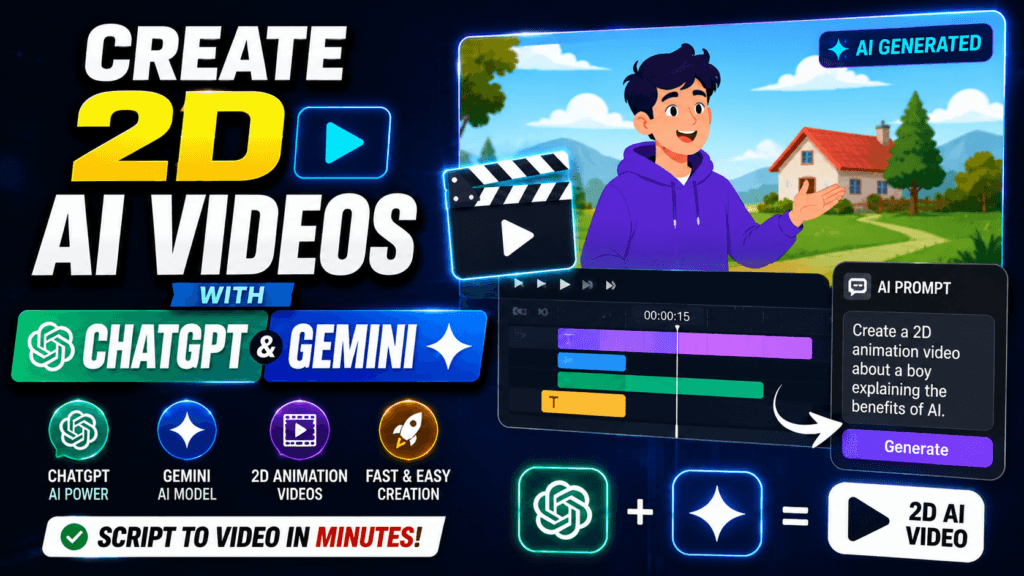
What Are 2D AI Videos?
Create 2D AI Videos with ChatGPT & Gemini – Just a few years ago, creating an animated 2D video required professional software, drawing skills, and countless hours of editing. Today, that barrier has almost disappeared. Thanks to modern artificial intelligence, anyone can transform a simple idea into an animated video using nothing more than text prompts. Whether you are a YouTuber, educator, marketer, student, or business owner, AI has dramatically simplified the animation process.
A 2D AI video is an animation generated with the help of artificial intelligence instead of being manually drawn frame by frame. Instead of designing every character, background, and movement yourself, you simply describe what you want. AI tools then generate illustrations, scenes, characters, dialogue, and even camera movements based on your instructions. This allows beginners to produce professional-looking animations without expensive software or years of experience.
The biggest advantage is speed. A project that previously required several days can now be completed within an hour. AI also removes many technical barriers by handling lighting, perspective, scene composition, and character consistency automatically. Recent advancements have made this process even easier, with Google’s Gemini Omni allowing users to generate and edit videos through simple conversations using text, images, or existing videos.
Why 2D AI Videos Are Trending
Artificial intelligence has transformed content creation across every platform. YouTube Shorts, Instagram Reels, TikTok, Facebook Reels, and educational channels are filled with AI-generated animations that attract millions of views. Many creators are discovering that viewers care more about storytelling than expensive production quality.
Act as an expert Al Video Prompt Engineer. Your task is to generate a highly detailed, cinematic text-to-video prompt based on the topic I provide at the end,
Every prompt you generate must strictly follow these rules:
1.Art Style: Strict Anime style (Studio Ghibli/Makoto Shinkai vibe). NO Wester cartoon, NO 3D Pixar style. Smooth, nostalgic, and peaceful.
2.Characters: Indian characters with simpl Indian clothing (Kurta-Pyiama, shirts, etc.), clean anime linework.
3.Location: Beautiful, serene Indian village (Rural India), lush green fields, brick rooftops, starry/moonlit night or golden hour.
4. Camera: Subtle, oraanic movements. gentle wind blowing, cinematic wide angles.
Structure of the output:
Video Prompt: [Detailed prompt in English optimized for Al video models, no dialogues only subtle gesture]
MY TOPIC: [14-15 years boys playing cricket.
Another major reason behind this trend is affordability. Traditional animation software often requires costly subscriptions and powerful computers. AI tools reduce those costs significantly by performing the heavy creative work in the cloud. Beginners can now focus on writing engaging stories instead of learning complicated animation software.
Businesses are also embracing AI-generated animations because they provide a quick way to explain products, train employees, create advertisements, and produce educational materials. Small startups that once couldn’t afford animation studios now have access to professional-quality visuals generated entirely through AI.
Recent improvements in Gemini Omni have expanded these capabilities further by supporting text, images, and video editing within a single conversation, making the entire production process much more accessible.
Can ChatGPT Create 2D Videos?
A common misconception is that ChatGPT directly generates finished animated videos. In reality, ChatGPT serves as the creative brain behind your production workflow rather than the animation engine itself.
ChatGPT excels at creating detailed scripts, character descriptions, scene breakdowns, dialogues, camera instructions, and image prompts. Instead of spending hours planning your animation manually, you can ask ChatGPT to generate a complete storyboard in minutes. It can even rewrite scenes to improve pacing, humor, or emotional impact depending on your audience.
For example, you might ask ChatGPT to create a five-scene children’s story about a brave rabbit exploring a magical forest. Within seconds, you’ll receive structured scenes, character actions, dialogue, and detailed prompts that can be used inside image-generation or video-generation tools.
Many successful AI creators use ChatGPT as the planning stage before moving into image generation and animation. This workflow ensures consistency throughout the project because every scene follows a logical sequence. Once the prompts are ready, they can be used with image generators or AI video models to produce the final animation.
Can Gemini Create 2D Videos?
Unlike ChatGPT, Gemini now includes native AI video generation capabilities through Gemini Omni. Users can generate videos from simple text descriptions, combine text with images, edit existing videos, modify scenes, change backgrounds, and even perform multi-step edits using natural conversation. Google describes the experience as creating videos “as easily as having a conversation.”
Gemini Omni supports several powerful features, including:
| Feature | Availability |
|---|---|
| Text-to-video | ✅ |
| Image-to-video | ✅ |
| Video editing | ✅ |
| Multi-turn editing | ✅ |
| AI avatars | ✅ |
| Native audio generation | ✅ |
| Aspect ratio selection | ✅ |
These features allow creators to generate animated content with minimal effort. Instead of exporting projects between multiple applications, creators can refine scenes directly through follow-up prompts. For instance, after generating a clip, you can simply ask Gemini to change the lighting, replace a character, modify the background, or adjust camera movement without starting over. Google continues expanding these capabilities for eligible Google AI subscribers.
ChatGPT vs Gemini for 2D Animation
Choosing between ChatGPT and Gemini depends on which stage of the animation process you need the most help with. Rather than thinking of them as competitors, many creators use them together because each tool excels at different tasks. ChatGPT is exceptional at brainstorming stories, developing engaging dialogue, refining scripts, and generating highly detailed prompts. Gemini, on the other hand, goes a step further by integrating AI-powered video generation and editing capabilities into the same workflow.
The table below highlights the key differences:
| Feature | ChatGPT | Gemini |
|---|---|---|
| Story Writing | ✅ Excellent | ✅ Very Good |
| Prompt Generation | ✅ Excellent | ✅ Excellent |
| Scene Planning | ✅ Excellent | ✅ Very Good |
| AI Image Assistance | ✅ Yes | ✅ Yes |
| Native Video Generation | Limited (depends on available features/tools) | ✅ Yes (supported plans/features) |
| AI Video Editing | Limited | ✅ Yes |
| Multi-turn Video Editing | Limited | ✅ Yes |
If you’re creating YouTube Shorts, Instagram Reels, or educational animations, a practical workflow is to use ChatGPT for the creative planning and Gemini for generating or refining the final video. This combination reduces production time while maintaining a consistent story and visual style.
Step-by-Step Workflow
Creating a professional-looking 2D AI video doesn’t require advanced animation skills anymore. Breaking the process into clear stages makes it easier to produce polished content that keeps viewers engaged.
Writing the Story
Every successful animation starts with a compelling story. Instead of jumping directly into visuals, focus on building a simple narrative with a clear beginning, middle, and ending. ChatGPT can help generate character profiles, dialogue, emotional beats, and scene-by-scene descriptions tailored to your audience.

For example, if you’re making content for children, ask for a short, positive story with colorful characters and a clear moral lesson. If your audience is on YouTube Shorts, request a fast-paced script that captures attention within the first few seconds. A well-structured script also ensures that your visuals remain consistent throughout the video.
Creating Image Prompts
Once the script is ready, convert every scene into a detailed image prompt. A good prompt should describe:
- Character appearance
- Facial expressions
- Clothing
- Background
- Camera angle
- Lighting
- Art style
- Color palette
Instead of writing:
“A boy walking.”
Write something like:
“A cheerful eight-year-old boy wearing a blue hoodie walking through a colorful cartoon forest, bright morning sunlight, soft shadows, Pixar-inspired 2D illustration, vibrant colors, cinematic composition.”
Detailed prompts produce much more consistent and visually appealing results.
Animating the Images
After generating the artwork, the next step is animation. Modern AI video tools can add movement, camera pans, facial expressions, lip-sync, and environmental effects with only a few text instructions.
Keep movements natural and avoid overcrowding the scene with unnecessary action. Subtle animations—such as blinking, waving, walking, or gentle camera movement—often look more professional than trying to animate everything at once. If your platform supports iterative editing, refine each scene gradually instead of regenerating the entire sequence.
Adding Voice and Music
Audio plays a huge role in how viewers perceive an animation. Even beautiful visuals can feel incomplete without suitable narration, sound effects, and background music.
Choose a voice that matches the tone of your content. A warm and expressive narration works well for storytelling, while an energetic voice may be better for educational or promotional videos. Background music should complement the scene rather than overpower it. Small details such as footsteps, birds chirping, rain, or ambient sounds make the animation feel more immersive.
Best Prompt Examples
Well-written prompts are often the difference between an average AI-generated video and one that looks polished and engaging. The more descriptive your prompt is, the better the AI understands your creative vision.
Cartoon Style Prompt
“Create a colorful 2D cartoon animation of a curious young explorer discovering a magical forest filled with glowing flowers, friendly animals, floating butterflies, warm golden sunlight filtering through tall trees, cheerful atmosphere, smooth camera movement, expressive facial animations, high-quality children’s animation style.”
This prompt combines character details, environment, lighting, mood, and animation direction into one cohesive description.
Kids Animation Prompt
“Generate a 2D educational animation featuring a smiling talking lion teaching children about kindness in a bright jungle classroom, vibrant colors, playful expressions, soft animation, friendly voice style, engaging educational visuals suitable for preschool audiences.”
Prompts like these provide enough context for AI systems to produce scenes that are visually consistent and audience-appropriate.
Common Mistakes to Avoid
Many beginners assume that AI will automatically produce perfect results from a single sentence. While AI has become remarkably capable, the quality of the output still depends heavily on the quality of your instructions.
One common mistake is using prompts that are too vague. Descriptions like “make a cartoon” leave too much room for interpretation, resulting in inconsistent characters or environments. Adding details about the art style, camera angle, lighting, emotions, and character appearance leads to much stronger results.
Another issue is changing the character description from one scene to the next. If the character wears a blue jacket in Scene 1 and a red hoodie in Scene 2 without explanation, the animation may lose continuity. Maintaining a consistent character sheet helps create a more professional final product.
Creators also tend to overuse dramatic camera movements or excessive visual effects. Simple, clean animations often perform better because viewers can focus on the story instead of distracting transitions. Prioritize storytelling first and visual complexity second.
Best Use Cases for 2D AI Videos
The growing accessibility of AI-powered animation has opened the door to countless creative and professional opportunities. Whether you’re an individual creator or part of a business, 2D AI videos can help you produce engaging content quickly and cost-effectively.
One of the most popular applications is short-form social media content. Platforms like YouTube Shorts, Instagram Reels, and TikTok reward entertaining and visually appealing videos. AI-generated animations can explain facts, tell mini-stories, present product reviews, or create motivational content without requiring expensive production equipment.
Education is another area where AI animation excels. Teachers and online educators can simplify complex topics with colorful animated characters, diagrams, and storytelling. Young learners, in particular, respond well to visual explanations, making AI-generated educational videos more engaging than plain text or static slides.
Businesses are also embracing AI for marketing. Product demonstrations, onboarding videos, customer support tutorials, and promotional campaigns can all be created faster with AI-assisted workflows. Small businesses that previously lacked the budget for animation studios can now produce professional-looking content at a fraction of the traditional cost.
Content creators are also using AI to produce:
- Animated bedtime stories
- Children’s learning videos
- History explainers
- Language-learning lessons
- Financial education content
- Health awareness campaigns
- Product advertisements
- Brand storytelling
- YouTube automation videos
The flexibility of AI-generated 2D animation means that almost any topic can be transformed into engaging visual content.
Future of AI Animation
Artificial intelligence is evolving at an incredible pace, and animation is one of the industries experiencing the fastest transformation. The latest generation of AI models can already generate consistent characters, understand long conversations, edit existing videos, and synchronize audio with visuals. Future updates are expected to make these capabilities even more advanced.
One exciting trend is real-time collaborative editing, where creators can refine animations through natural conversations with AI. Instead of manually adjusting timelines and keyframes, you’ll simply describe the changes you want, and the AI will apply them almost instantly.
Another major development is improved character consistency. Earlier AI systems sometimes changed facial features, clothing, or proportions between scenes. Newer models are becoming much better at maintaining the same appearance throughout an entire project, making long-form storytelling more practical.
Voice generation is also advancing rapidly. AI voices are becoming increasingly natural, with realistic emotions, pauses, and expressions. Combined with automatic lip-syncing, this will allow creators to produce studio-quality animations with minimal manual editing.
Looking ahead, AI is likely to become a creative partner rather than a replacement for human imagination. The most successful creators will be those who combine compelling storytelling, thoughtful prompts, and AI-powered production tools to create unique experiences for their audiences.
Conclusion
Creating 2D AI videos has never been more accessible. What once required professional animators, expensive software, and weeks of production can now begin with a simple idea and a well-written prompt. By using ChatGPT to develop scripts, storyboards, and detailed scene descriptions—and pairing that with modern AI video tools such as Gemini’s video-generation capabilities—you can dramatically reduce the time and effort needed to produce high-quality animations.
The key to success isn’t just relying on AI; it’s learning how to guide it effectively. Strong storytelling, detailed prompts, consistent character design, and thoughtful editing all contribute to videos that capture attention and keep viewers engaged. Whether your goal is to grow a YouTube channel, educate students, market a product, or simply explore your creativity, AI provides an exciting set of tools to bring your ideas to life.
As AI technology continues to improve, the possibilities for animation will only expand. Starting now gives you the opportunity to build skills, experiment with new workflows, and stay ahead in a rapidly changing digital landscape.
Frequently Asked Questions (FAQs)
1. Can beginners create 2D AI videos without animation experience?
Yes. Modern AI tools allow beginners to create animated videos using text prompts, making the process much easier than traditional animation workflows.
2. Is ChatGPT enough to create a complete 2D AI video?
ChatGPT is excellent for generating scripts, stories, scene descriptions, and prompts. To produce the final animation, you’ll typically use an AI image or video generation tool alongside it.
3. Can Gemini generate videos directly from text?
Google has introduced video-generation capabilities for eligible Gemini experiences, allowing users to create and edit videos using conversational prompts, depending on feature availability and subscription access.
4. What makes a good AI animation prompt?
A strong prompt includes details about the character, background, lighting, camera angle, art style, colors, mood, and desired animation style. The more specific your instructions, the better the generated result.
5. Can AI-generated 2D videos be monetized on YouTube?
Yes, provided your videos comply with YouTube’s monetization policies. Focus on adding original storytelling, meaningful editing, narration, and creative value rather than publishing repetitive or low-effort AI-generated content.