 Saiteja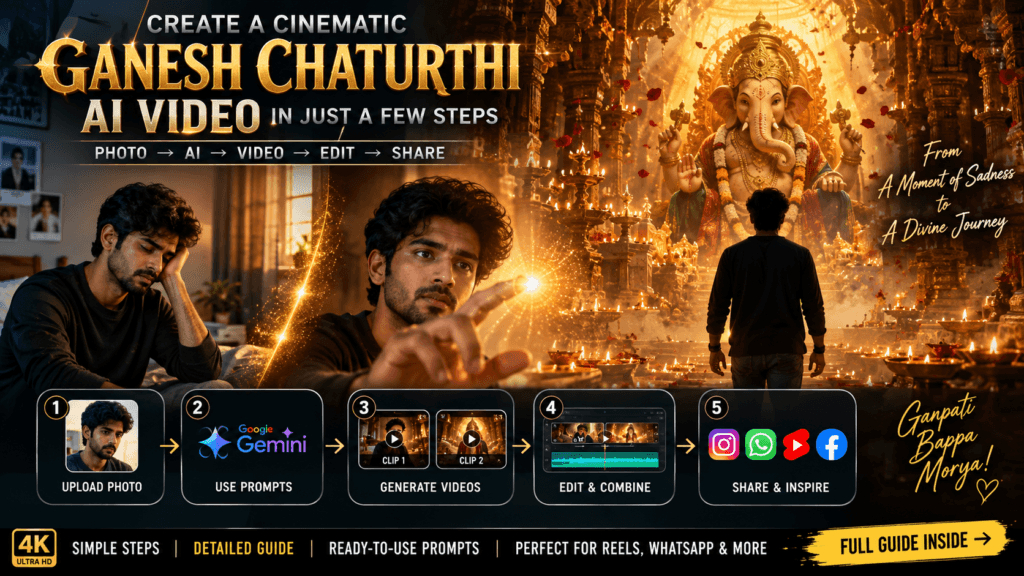
Want to turn a simple photo into a cinematic Ganesh Chaturthi AI video? With the right image, detailed prompts, and a simple editing workflow, you can create a stunning devotional video in just a few steps.
In this guide, we’ll create a 20-second cinematic video using two separate 10-second AI-generated clips, and then combine them into one final video that you can share on Instagram, WhatsApp, YouTube Shorts, and other social platforms.
What You’ll Need
Before starting, keep these things ready:
- A clear photo of yourself
- Google Gemini with video-generation capability
- The Clip 1 prompt
- The Clip 2 prompt
- Any video editing app such as CapCut, VN, InShot, or your preferred editor
- A suitable devotional/cinematic song
The most important part is choosing a clear, high-quality reference photo. A front-facing or slightly angled photo with a clearly visible face generally works best for maintaining character consistency.
Step 1: Prepare Your Reference Photo
First, choose the photo that you want to use as your character reference.
The AI should be able to clearly see:
- Your face
- Hairstyle
- Facial features
- Skin tone
- Facial hair, if applicable
- Body proportions
- Clothing
For the best results, avoid using a heavily edited, blurry, extremely dark, or low-resolution photo.
This image will be used as the identity reference for both video clips.
Step 2: Open Google Gemini
Open Google Gemini and go to the image/video generation feature available in your account.
Upload your reference photo.
Select the Video option and make sure the generation duration is set to 10 seconds, if that option is available.
The goal is to generate two separate clips:
Clip 1:
Sad/emotional beginning → mysterious golden particle → transformation → ancient temple
Create a 10-second ultra-cinematic vertical 9:16 video using the uploaded reference image of the young man as the STRICT IDENTITY REFERENCE.

The uploaded image is ONLY for the man's identity and appearance reference, NOT a frozen facial-expression reference.

CHARACTER IDENTITY — ABSOLUTE PRIORITY:

The man must remain the exact same real person from the uploaded reference image.

Preserve his:
exact facial identity,
facial structure,
face shape,
eyes,
eyebrows,
nose,
lips,
cheeks,
jawline,
skin tone,
hairstyle,
facial hair,
age appearance,
body proportions,
and clothing.

Do not redesign or beautify his face.

However, his facial expression MUST change naturally according to the story.

IDENTITY MUST STAY CONSTANT.
EXPRESSION MUST EVOLVE NATURALLY.

He must look like a real human actor performing emotionally in front of a professional cinema camera, NOT like a still photograph pasted onto a moving body.

FACIAL ACTING IS CRITICAL:

Allow realistic movement of:
eyes,
eyelids,
eyebrows,
forehead,
cheeks,
lips,
jaw,
and subtle facial muscles.

Natural blinking.
Natural breathing.
Natural eye focus.
Subtle micro-expressions.
Realistic emotional transitions.

Do not freeze his face.
Do not keep the reference photograph expression throughout.
Do not make him stare blankly.
Do not overact.

STORY:

SHOT 1 — 0–2.5 SEC
Start inside the same realistic room from the reference image.

The young man is sitting alone quietly near a window during a warm, slightly dim evening.

IMPORTANT STARTING EMOTION:
He looks genuinely sad, emotionally tired and slightly lost.

His shoulders are naturally relaxed.
His posture feels slightly heavy.
His eyes look downward.
His expression shows subtle sadness and loneliness.

Do NOT make him cry dramatically.
No tears streaming down his face.
Keep the sadness realistic and subtle.

Show natural breathing, a slow blink and tiny facial movements.

Camera:
medium-wide cinematic shot,
slightly side angle,
slow gentle dolly toward him.

Warm evening sunlight enters softly through the window while the rest of the room remains slightly darker.

SHOT 2 — 2.5–4 SEC
Move into a closer 3/4 facial angle.

He slowly looks up.

His sadness remains visible, but he notices something unusual in front of him.

A tiny mysterious golden particle appears floating in the air.

The warm golden light softly reflects inside his eyes.

His eyebrows lift slightly.
His eyes focus precisely on the particle.

His emotion naturally changes:

sadness → curiosity.

The change must happen gradually and realistically.

SHOT 3 — 4–6 SEC
Over-the-shoulder shot from behind him.

The tiny golden particle slowly floats closer.

He raises his hand toward it.

Close-up of his face:
his eyes follow the particle naturally.

As his fingertip approaches the particle, his expression shows growing curiosity and subtle disbelief.

Natural blinking.
Natural eye movement.
Natural breathing.

SHOT 4 — 6–8 SEC
Extreme cinematic close-up of his fingertip touching the golden particle.

At the exact moment of contact:

A powerful circular burst of golden light expands outward.

His face reacts naturally with genuine surprise.

His eyes widen slightly.
Eyebrows rise naturally.
His lips part subtly.

Emotion:

curiosity → surprise → wonder.

The golden light illuminates his face realistically.

SHOT 5 — 8–10 SEC
The room begins transforming around him.

Walls slowly dissolve into thousands of realistic golden particles.

Furniture breaks apart into glowing dust.

Ancient carved Indian stone pillars and temple architecture begin emerging through the golden particles.

The camera smoothly performs a cinematic 180-degree orbit around him.

He looks around naturally in genuine amazement.

His facial expression continues changing naturally.

At the end of the clip, the transformation becomes almost complete.

FINAL FRAME OF CLIP 1:

The young man is now standing at the entrance of a gigantic ancient Indian temple.

He is facing deep into the temple.

Hundreds of warm oil lamps glow in the distance.

Golden particles float around him.

Atmospheric incense smoke fills the temple.

Through thick golden mist, the very faint silhouette of a gigantic Lord Ganesha idol can be seen far away.

His expression is now a mixture of wonder and anticipation.

HOLD THIS EXACT FINAL COMPOSITION.

CLIP 2 MUST START FROM THIS EXACT MOMENT.

VISUAL STYLE:

Ultra-photorealistic.
Premium Indian cinematic film aesthetic.
Realistic human skin texture.
Visible natural pores.
Realistic eyes.
Natural facial micro-expressions.
Highly detailed ancient Indian temple architecture.
Realistic stone.
Realistic gold.
Realistic oil lamps.
Realistic smoke and incense.
Volumetric golden lighting.
Atmospheric fog.
Deep cinematic shadows.
Natural exposure.
Subtle film grain.
Anamorphic cinematic characteristics.
High dynamic range without excessive HDR.

CAMERA:

Professional cinema camera.
85mm portrait look for facial shots.
Smooth dolly.
Controlled orbit.
Natural camera movement.
Realistic depth of field.
Natural motion blur.
No artificial camera movement.

NEGATIVE:

No face morphing.
No identity change.
No different person.
No frozen facial expression.
No blank stare.
No artificial smile.
No exaggerated acting.
No waxy skin.
No plastic skin.
No AI-looking face.
No distorted hands.
No extra fingers.
No malformed anatomy.
No duplicate person.
No duplicate objects.
No cartoon appearance.
No CGI-looking human.
No fantasy-looking environment.
No random text.
No subtitles.
No watermark.
Clip 2:
Temple → Ganesha reveal → divine golden light → cinematic ending
Create a 10-second ultra-cinematic vertical 9:16 video.

THIS IS CLIP 2 OF A CONTINUOUS CINEMATIC STORY.

CONTINUITY IS EXTREMELY IMPORTANT.

START EXACTLY FROM THE FINAL FRAME OF CLIP 1.

The first frame must show the SAME young man standing at the entrance of the gigantic ancient Indian temple.

He is facing toward the distant, partially hidden Lord Ganesha idol.

Maintain exactly the same:
face,
hairstyle,
facial hair,
skin tone,
age appearance,
body proportions,
clothing,
lighting,
golden particles,
smoke,
temple architecture,
camera perspective,
and emotional state from the end of Clip 1.

DO NOT restart the story.

DO NOT show the room again.

DO NOT change the character.

IDENTITY + FACIAL PERFORMANCE:

The uploaded reference image is used strictly for identity.

Preserve the exact real person's facial identity and anatomy.

But allow full natural facial acting.

Identity stays constant.
Expressions change naturally.

The man's face must behave like a real Indian actor performing in a high-budget cinematic movie.

Use realistic:
eye movement,
eyelid movement,
eyebrow movement,
cheek movement,
lip movement,
jaw movement,
forehead movement,
breathing,
blinking,
and subtle micro-expressions.

His eyes must actively focus on Lord Ganesha.

His emotions must evolve naturally:

wonder → awe → emotional devotion → peaceful happiness.

Do NOT keep the same expression for the entire clip.

SHOT 1 — 0–2 SEC

Start with the EXACT final composition from Clip 1.

Camera slowly moves forward from behind the man.

He stands silently inside the gigantic temple.

Hundreds of glowing oil lamps are visible on both sides.

Incense smoke slowly moves through the air.

Golden particles float around him.

The distant Ganesha silhouette becomes slightly clearer.

His breathing is subtle.

His head moves naturally.

His eyes focus on Ganesha.

Expression:
quiet wonder and anticipation.

SHOT 2 — 2–4 SEC

Camera slowly moves to a 3/4 side angle.

We see part of his face.

He slowly turns his head toward Lord Ganesha.

Warm golden light begins reflecting across his face.

His eyes become wider with awe.

His eyebrows move subtly.

His lips relax slightly.

His previous sadness is completely disappearing.

Emotion:
wonder → awe.

The acting must be subtle and realistic.

SHOT 3 — 4–6 SEC

Smooth over-the-shoulder cinematic shot.

The gigantic Lord Ganesha idol slowly emerges from the mist.

Reveal a premium professionally handcrafted physical idol.

Massive golden crown.
Deep red and saffron drapery.
Heavy traditional jewellery.
Detailed ornaments.
Fresh flower garlands.
Realistic handcrafted textures.
Realistic gold reflections.

The idol must look like a real physical festival idol photographed inside a real temple mandap.

NOT cartoon.
NOT CGI.
NOT plastic.

The man remains in the foreground.

His eyes stay naturally focused on Ganesha.

His expression becomes deeply peaceful and emotionally moved.

SHOT 4 — 6–8 SEC

Camera slowly cranes upward and backward, revealing the enormous scale of the temple.

Suddenly, a powerful warm golden light ignites behind Lord Ganesha.

A massive divine halo forms naturally through the incense mist.

Hundreds of flower petals slowly rise upward.

Oil lamps flicker realistically.

Golden particles float through the air.

The golden light softly illuminates the man's face.

His eyes show genuine awe.

A subtle emotional smile begins to appear.

Emotion:
awe → devotion.

Do NOT make the smile exaggerated.

SHOT 5 — 8–10 SEC

Epic cinematic final reveal.

Camera performs a slow dramatic push toward the enormous glowing Ganesha idol.

The young man remains in the foreground.

He is slightly silhouetted by the golden light.

His face is still partially visible from the side.

His expression is now peaceful, emotional and devotional.

A very subtle genuine smile.

Natural blinking.
Natural breathing.
Natural eye focus.

The temple is filled with:

hundreds of glowing diyas,
incense smoke,
floating golden particles,
rising flower petals,
massive temple architecture,
warm golden volumetric light,
deep cinematic shadows.

FINAL FRAME:

A breathtaking wide hero composition.

The young man stands respectfully before the enormous radiant Lord Ganesha.

The gigantic Ganesha idol dominates the background.

A huge golden halo glows behind Ganesha.

Flower petals float upward.

Golden mist surrounds the scene.

Hundreds of lamps illuminate the ancient temple.

The man's emotional journey has completed:

SADNESS → CURIOSITY → SURPRISE → WONDER → AWE → DEVOTION → PEACEFUL JOY.

Hold the final frame for a brief cinematic moment.

VISUAL STYLE:

Ultra-photorealistic.
Premium Indian feature-film cinematography.
Realistic human skin.
Natural facial pores.
Realistic eyes.
Natural facial micro-expressions.
Realistic handcrafted Ganesha idol.
Detailed jewellery.
Realistic fabric.
Realistic flowers.
Physically accurate golden materials.
Volumetric light.
Atmospheric incense smoke.
Realistic fire.
Deep cinematic shadows.
Subtle film grain.
Anamorphic lens characteristics.
Epic cinematic scale.

CAMERA:

Behind-the-subject tracking.
Slow 3/4 profile reveal.
Over-the-shoulder shot.
Smooth crane movement.
Slow cinematic push-in.
Realistic camera physics.
Natural depth of field.
Natural motion blur.

CONTINUITY REQUIREMENTS:

Clip 2 must visually continue from Clip 1 without feeling like a new video.

Same person.
Same face.
Same hairstyle.
Same clothing.
Same temple.
Same lighting.
Same smoke.
Same golden particles.
Same emotional state at the beginning.

NEGATIVE:

No face morphing.
No identity change.
No frozen face.
No photograph-like facial expression.
No blank stare.
No fake smile.
No exaggerated emotions.
No sudden facial changes.
No waxy skin.
No plastic skin.
No AI-looking face.
No distorted hands.
No extra fingers.
No malformed anatomy.
No duplicate person.
No duplicate Ganesha.
No cartoon.
No CGI-looking human.
No plastic-looking idol.
No unrealistic glow.
No oversaturation.
No excessive HDR.
No random text.
No subtitles.
No watermark.

The final result must look like a real professionally filmed Indian cinematic devotional sequence featuring a real human actor and a real handcrafted Ganesha idol.
Step 3: Generate the First 10-Second Clip
Upload your reference photo to Gemini.
Now copy the complete Clip 1 prompt and paste it into Gemini.
The prompt instructs the AI to begin with you sitting alone in your room with a subtle sad expression.
A mysterious golden particle then appears.
You notice the particle and reach toward it.
When your fingertip touches it, the particle creates a powerful golden explosion.
The room then transforms into an enormous ancient Indian temple.
The camera uses multiple cinematic angles, including:
- Medium-wide shot
- Over-the-shoulder shot
- Facial close-up
- Extreme close-up
- 180-degree camera movement
- Wide temple reveal
The most important part is the facial acting.
Your expression should gradually change from:
Sadness → Curiosity → Surprise → Wonder
The prompt specifically tells the AI not to freeze the reference image’s expression. Instead, your face should behave like a real actor performing in a cinematic movie.
Clip 1 Ending
At the end of the first 10 seconds, you should be standing at the entrance of a gigantic ancient Indian temple.
Hundreds of lamps should be visible.
Golden particles and incense smoke should fill the environment.
A huge Ganesha idol should only be partially visible through the mist.
This ending frame becomes the visual bridge into Clip 2.
Step 4: Generate the Second 10-Second Clip
Now create the second video.
Upload the same reference photo again.
Select the Video option and choose 10 seconds.

Copy and paste the complete Clip 2 prompt.
The second prompt is designed to continue the story from the first clip.
It begins with you standing inside the temple and looking toward the distant Ganesha idol.
The camera gradually moves around you and reveals your facial expression.
Your emotions continue naturally:
Wonder → Awe → Devotion → Peaceful Joy
The Ganesha idol is gradually revealed from the mist.
It features:
- A massive golden crown
- Traditional jewellery
- Red and saffron drapery
- Flower garlands
- Detailed ornaments
- Realistic handcrafted textures
Then the major cinematic moment happens.
A powerful golden light appears behind Ganesha, creating a massive divine halo.
Flower petals begin floating upward.
Hundreds of lamps illuminate the temple.
The camera slowly pulls back and then pushes toward the enormous Ganesha idol.
The final shot shows you in the foreground while the gigantic glowing Ganesha idol dominates the background.
Step 5: Keep the Character Consistent
One of the biggest challenges with AI-generated videos is character consistency.
To improve consistency, use the same reference photograph for both clips.
Also avoid changing:
- Hairstyle
- Clothing
- Facial appearance
- Character description
- Overall visual style
The prompts already contain detailed instructions such as:
Identity must stay constant. Expression must evolve naturally.
This is important because we want the AI to preserve your identity while still allowing your face to show different emotions.
The goal is not to keep your face frozen like a photograph.
Instead, the face should naturally act according to the story.
Step 6: Combine Both Videos
Once both videos are generated, download/save them to your device.
Open your preferred video editing application.
Create a new project and import:
Clip 1 → Clip 2
Place Clip 2 immediately after Clip 1.
Because the prompts are designed as a continuous story, the two clips should feel like one cinematic sequence.
Suggested Timeline
0–2.5 sec:
Sad young man sitting in his room
2.5–4 sec:
Golden particle appears
4–6 sec:
He reaches toward the particle
6–8 sec:
Golden transformation begins
8–10 sec:
Ancient temple appears
10–12 sec:
Camera enters the temple

12–14 sec:
Ganesha begins appearing through the mist
14–16 sec:
Divine golden halo appears
16–18 sec:
Flower petals and golden light fill the temple
18–20 sec:
Epic final Ganesha reveal
Step 7: Add Music
Now add a suitable Ganesh Chaturthi devotional or cinematic background track.
Choose music that starts softly and gradually becomes more powerful.
For example, the music can follow the same emotional progression:
Beginning:
Soft, emotional and mysterious
Transformation:
Rising cinematic sound
Ganesha Reveal:
Powerful devotional music
Final Shot:
Epic divine climax
Try to synchronize the strongest musical beat with the moment when the golden halo appears behind Ganesha.
This can make the final reveal much more impactful.
Step 8: Add Cinematic Effects
You can enhance the final video with subtle editing effects.
Consider adding:
- Slow zoom
- Cinematic transitions
- Light particles
- Golden light effects
- Slight motion blur
- Subtle film grain
- Slow-motion effect during the Ganesha reveal
- Sound effects for the golden transformation
- Temple bells
- Soft ambience
- Incense/smoke effects
However, avoid using too many effects.
The AI-generated footage already contains cinematic lighting and atmosphere, so subtle editing usually looks more professional.
Step 9: Export the Final Video
After combining the two clips and adding music/effects, export the final video in:
9:16 vertical format
This format is ideal for:
- Instagram Reels
- Instagram Stories
- WhatsApp Status
- YouTube Shorts
- Facebook Reels
For a high-quality result, use the highest resolution and bitrate available in your editing application.
Final Result
After completing these steps, your two AI-generated clips become one 20-second cinematic Ganesh Chaturthi video:
Sadness → Mystery → Transformation → Temple → Ganesha → Divine Light → Devotion
The result can look like a scene from a cinematic Indian devotional film rather than a simple AI-generated image animation.
Quick Workflow
Reference Photo
↓
Open Google Gemini
↓
Upload Photo
↓
Select Video – 10 Seconds
↓
Paste Clip 1 Prompt
↓
Generate Clip 1
↓
Upload Same Photo Again
↓
Paste Clip 2 Prompt
↓
Generate Clip 2
↓
Open Video Editor
↓
Add Clip 1 + Clip 2
↓
Add Music + Effects
↓
Export 9:16 Video
↓
Post on Instagram / WhatsApp
Pro Tip for Better AI Facial Expressions
If your generated video looks like a still photo moving through a scene, the problem is usually that the AI is treating your reference image as a fixed facial expression.
That’s why the prompts specifically distinguish between identity and expression.
Your identity should remain unchanged, while your expression should naturally evolve with the story.
For this particular video, the ideal progression is:
😔 Sad → 👀 Curious → 😮 Surprised → 😲 Amazed → 🙏 Devotional → 😊 Peaceful
That emotional progression will make the final video feel much more human, cinematic, and believable.
Conclusion
You don’t need professional filmmaking equipment to create this type of Ganesh Chaturthi video. With a good reference photograph, carefully written AI prompts, two 10-second generations, and simple video editing, you can create a 20-second cinematic devotional video suitable for Instagram and WhatsApp.
Ganpati Bappa Morya! 🙏🐘✨