1. 📸 Photography & Realistic Effects
Photo & Camera Effects
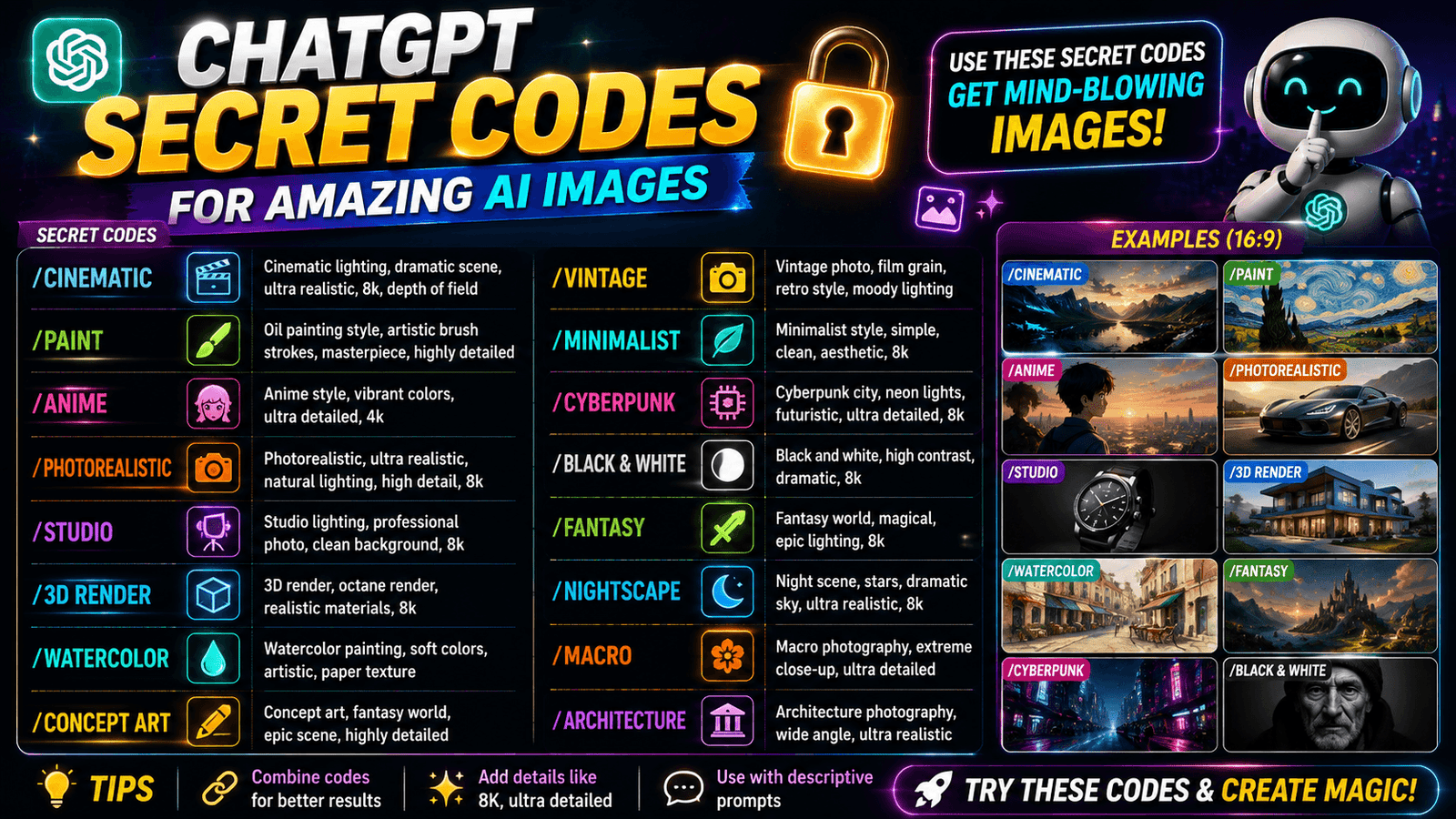
1. /photorealistic – Makes the edited image look like a real photograph.
2. /hyperreal – Makes the image extremely detailed and realistic.
3. /cinematic – Gives the photo a movie-like look.
4. /imax – Creates a dramatic, large-scale cinematic appearance.
5. /hdr – Improves detail and contrast between bright and dark areas.
6. /filmgrain – Adds a vintage film-grain texture.
7. /polaroid – Makes the photo look like a Polaroid picture.
8. /retro90s – Gives the image a nostalgic 1990s look.
9. /y2k – Creates an early-2000s futuristic aesthetic.
10. /bokeh – Adds a soft, blurry background.
11. /fisheye – Creates a wide, curved fisheye-lens effect.
12. /macro – Creates an extreme close-up photography look.
13. /droneview – Makes the image look like it was shot from above.
14. /silhouette – Turns the subject into a dark silhouette.
15. /doubleexposure – Blends two images or scenes together.
Lighting & Visual Effects
16. /goldenhour – Adds warm, soft golden sunlight.
17. /sunset – Gives the scene a warm sunset atmosphere.
18. /sunrise – Creates a bright morning-sunrise look.
19. /moonlight – Gives the image a cool moonlit appearance.
20. /neon – Adds bright glowing neon lights.
21. /cyberpunk – Gives the photo a futuristic neon look.
22. /synthwave – Creates a retro neon aesthetic.
23. /outrun – Gives the image a retro-futuristic look.
24. /glitch – Adds digital distortion effects.
25. /hologram – Makes the subject look like a holographic projection.
26. /holographic – Adds colorful holographic reflections.
27. /iridescent – Gives surfaces shifting rainbow-like colors.
28. /pearlescent – Adds a soft pearl-like shine.
29. /bioluminescent – Makes parts of the image appear to glow naturally.
30. /fire – Adds flames or fiery effects.
31. /electric – Adds glowing electrical energy.
32. /lightning – Adds lightning bolts and flashes.
33. /smoke – Adds smoke around the subject or scene.
34. /fog – Creates a thick foggy atmosphere.
35. /mist – Adds a soft, light mist effect.
36. /cloudscape – Adds dramatic or artistic clouds.
37. /aurora – Adds colorful Northern-Lights-style lighting.
2. 🎨 Artistic Styles
Art & Illustration
38. /mangacover – Turns your photo into a manga-style book cover.
39. /comicbook – Makes your photo look like a comic-book scene.
40. /watercolor – Converts the photo into a soft watercolor painting.
41. /vaporwave – Gives the image a pink-and-blue retro aesthetic.
42. /pixelart – Turns the photo into pixel art.
43. /lego – Makes the subject look like it is built from LEGO bricks.
44. /ascii – Recreates the image using keyboard characters.
45. /lowpoly – Turns the subject into a low-polygon 3D style.
46. /origami – Makes the subject look like folded paper art.
47. /claymation – Gives the photo a clay-animation appearance.
48. /papercut – Turns the image into layered paper-cut artwork.
49. /stainedglass – Makes the subject look like stained glass.
50. /oilpainting – Converts the photo into an oil painting.
51. /charcoal – Turns the photo into a charcoal drawing.

52. /pencilsketch – Makes the image look hand-drawn with pencil.
53. /inkdrawing – Converts the photo into black-ink artwork.
54. /ghibli – Gives the image a soft, hand-painted animated look.
55. /anime – Converts the subject into an anime-style character.
56. /chibi – Makes the person look like a cute, small-proportioned character.
57. /disney – Gives the image a classic animated-film look.
58. /pixar – Gives the subject a polished 3D animated appearance.
59. /dreamworks – Converts the photo into a 3D animated style.
60. /noir – Creates a dark black-and-white detective-film look.
61. /popart – Gives the image a bold, colorful pop-art style.
62. /cubism – Breaks the subject into geometric shapes.
63. /surreal – Creates a strange, dream-like version of the photo.
64. /abstract – Turns the image into non-realistic abstract art.
65. /expressionism – Gives the photo an emotional painting style.
66. /renaissance – Makes the subject look like a Renaissance painting.
67. /baroque – Gives the image a dramatic classical-painting look.
68. /gothic – Creates a dark medieval-gothic atmosphere.
69. /fantasy – Transforms the photo into a magical fantasy scene.
70. /mythology – Gives the subject a mythological appearance.
71. /medieval – Makes the photo look like it belongs in medieval times.
Drawing & Design Styles
72. /lineart – Converts the photo into clean outline art.
73. /doodle – Gives the image a hand-drawn doodle style.
74. /graffiti – Turns the image into street-art graffiti.
75. /spraypaint – Makes the image look spray-painted.
76. /marker – Creates a marker-drawn illustration.
77. /crayon – Gives the image a crayon-drawing style.
78. /pastel – Creates a soft pastel-art appearance.
79. /gouache – Converts the image into a gouache painting.
80. /acrylic – Gives the image an acrylic-paint appearance.
81. /impasto – Adds thick, visible paint strokes.
82. /fresco – Makes the image look like an old wall fresco.
83. /mosaic – Recreates the image using small colored tiles.
84. /mandala – Adds a detailed circular mandala design.
85. /zentangle – Adds detailed repetitive line patterns.
86. /tattoo – Turns the artwork into a tattoo-style design.
87. /tribal – Adds bold tribal-style patterns.
88. /boho – Gives the image a relaxed bohemian aesthetic.
89. /artdeco – Adds elegant geometric Art Deco styling.
90. /bauhaus – Uses simple geometric shapes and clean design.
91. /brutalist – Gives the image a raw, bold design.
92. /memphis – Adds colorful 1980s-style geometric shapes.
93. /gradientmesh – Creates smooth, flowing color gradients.
3. 🤖 Character & 3D Transformations
94. /aiavatar – Creates an AI-avatar version of the person.
95. /robot – Turns the person or subject into a robot.
96. /android – Gives the person a human-like robotic appearance.
97. /cyborg – Combines human features with robotic parts.
98. /virtualreality – Places the subject in a VR-style world.
99. /metaverse – Gives the image a futuristic digital-world appearance.
100. /matrix – Adds a Matrix-inspired digital-code aesthetic.
101. /voxel – Turns the subject into 3D blocks.
102. /blockworld – Creates a world made from large 3D blocks.

103. /minecraft – Gives the image a Minecraft-inspired look.
104. /roblox – Turns the person into a Roblox-style character.
105. /fortnite – Gives the subject a stylized game-character appearance.
106. /funko – Turns the person into a Funko-style collectible figure.
107. /actionfigure – Makes the person look like an action figure.
108. /toybox – Makes the subject look like a toy.
109. /miniature – Makes the person or scene look like a tiny model.
4. 🧱 Material & Texture Transformations
110. /woodcarving – Makes the subject look carved from wood.
111. /icecarving – Turns the subject into an ice sculpture.
112. /marble – Makes the subject look like a marble statue.
113. /bronze – Gives the subject a bronze-sculpture appearance.
114. /ceramic – Makes the subject look like ceramic.
115. /porcelain – Gives the subject a smooth porcelain finish.
116. /crystal – Turns the subject into a transparent crystal-like object.
117. /diamond – Gives the subject a diamond-like appearance.
118. /goldleaf – Covers the subject with a gold-leaf finish.
119. /silverchrome – Gives the subject a shiny chrome appearance.
120. /rusted – Adds an aged, rusty-metal texture.
121. /oxidized – Gives metal a greenish oxidized-copper look.
122. /carbonfiber – Applies a carbon-fiber texture.
123. /liquidmetal – Makes the subject look like flowing metal.
124. /moltengold – Creates a melted-gold appearance.
125. /glassart – Turns the subject into artistic glass.
126. /mirror – Gives the subject a reflective mirror-like surface.
5. 🖼️ Creative Designs & Formats
127. /magazinecover – Turns your photo into a magazine cover.
128. /newspaper – Makes the image look like newspaper print.
129. /passportphoto – Creates a passport-photo-style version.
130. /idcard – Places the person into an ID-card design.
131. /tradingcard – Turns the person into a collectible trading card.
132. /poster – Creates a poster using the photo as the main visual.
133. /billboard – Places the subject into a billboard-style advertisement.
134. /albumcover – Turns the photo into a music album cover.
135. /bookcover – Creates a book-cover design using the subject.
136. /storybookcover – Turns the image into a children’s storybook cover.
137. /magicalbook – Makes the image look like an ancient magical book.
138. /scroll – Places the image into an old scroll-style design.
139. /map – Converts the scene into an illustrated map.
140. /playingcard – Turns the subject into a playing-card design.
141. /tarotcard – Creates a tarot-card-style version.
142. /stamp – Turns the photo into a postage-stamp design.
143. /coin – Makes the subject look engraved on a coin.
144. /currency – Turns the image into a banknote-style design.
145. /emblem – Creates a premium emblem featuring the subject.
146. /crest – Turns the subject or design into a decorative crest.
147. /coatofarms – Creates a royal coat-of-arms-style design.
148. /badge – Turns the subject into an award or collectible badge.
149. /sticker – Creates a sticker-style version with a clean outline.
150. /emoji – Turns the subject into a 3D emoji-style character.
151. /icon – Simplifies the subject into an app or profile icon.