 Saiteja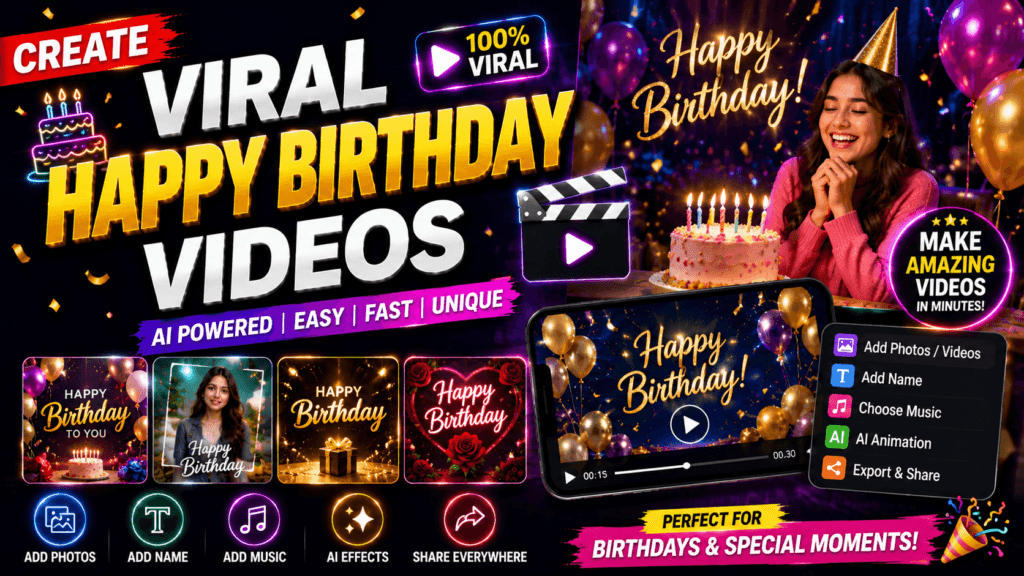
Creating viral Happy Birthday videos has become one of the easiest ways to grab attention on Instagram Reels, YouTube Shorts, TikTok, and Facebook. What once required expensive editing software and professional video editors can now be accomplished in minutes using AI-powered tools. Modern platforms provide ready-made templates, AI avatars, animated effects, voice generation, and automatic music synchronization that allow anyone to create impressive birthday greetings without advanced editing skills. Popular editing platforms continue to expand their libraries with trending birthday templates, making professional-looking videos accessible even to beginners.
Unlike traditional birthday cards, video greetings combine emotion, music, animation, and storytelling into one engaging experience. They encourage viewers to watch until the end, react emotionally, and share them with friends and family. Social media algorithms reward this engagement, increasing the chances of a video reaching thousands—or even millions—of viewers. If your goal is to create birthday videos that entertain, surprise, and inspire sharing, this guide will show you everything you need to know.
Why Birthday Videos Are More Popular Than Ever
Birthday videos have evolved from simple photo slideshows into highly engaging digital experiences. Today, creators use cinematic transitions, AI-generated animations, personalized voice messages, animated characters, and synchronized music to create memorable birthday surprises. This transformation has been fueled by the explosive growth of short-form video platforms such as Instagram Reels, YouTube Shorts, TikTok, and Facebook Reels, where visually appealing content spreads rapidly through algorithm-driven recommendations.
One of the biggest reasons these videos perform so well is their universal appeal. Everyone celebrates birthdays, making the content relatable regardless of age, language, or location. Whether it’s a funny birthday meme, an emotional tribute, or a luxurious cinematic montage, viewers instantly connect with the occasion. Emotional content naturally encourages likes, comments, shares, and saves—all of which signal quality to social media algorithms.
Another factor is the accessibility of AI-powered creative tools. Instead of spending hours editing, creators can now generate animated backgrounds, realistic voiceovers, talking avatars, and even entire video sequences from simple text prompts. This significantly reduces production time while improving quality. Even users with no editing experience can produce professional-looking birthday videos in under 30 minutes.
Brands and businesses have also recognized the popularity of personalized birthday content. Restaurants, ecommerce stores, influencers, schools, and corporate companies frequently create birthday greeting videos for customers and employees to increase engagement and build stronger relationships. Personalized videos feel more meaningful than generic messages, making recipients more likely to share them publicly. This organic sharing helps videos reach audiences far beyond the original recipient.
As AI continues improving throughout 2026, birthday videos are becoming increasingly interactive, creative, and visually stunning. Creators who combine personalization, storytelling, and trending editing styles are seeing exceptional engagement across multiple platforms.
The Rise of AI-Powered Birthday Wishes
Artificial Intelligence has completely transformed the way birthday greetings are created. Instead of manually designing every frame, creators simply describe their ideas in text, and AI generates impressive visuals within seconds. AI image generators can create fantasy birthday scenes, luxury party environments, cartoon characters, cinematic celebrations, and realistic portraits that look professionally designed.
8-second shot. vertical 9:16 ultra-photorealistic night park with warm street lights, cinematic bokeh, and film-quality lighting. A man wearing stylish white shirt walks naturallv into frame carrving a birthdav cake with lit "25" candles in one hand and a champagne bottle in the other. He sits naturally on the bench. naturally holding the cake in front of his without placinc it on the bench he briefly shakes the champaqne bottle with controlled excitement while stil holding the cake. he then forcefully slams the bottom of thechampagne bottle against on the bench. At the exact same instant he leans toward the cake and blows out the candles. The cork explodes off precisely as he blows, creating perfect synchronized timing. A powerful champagne fountain erupts
upward and sprays continuously with realistic pressure, droplets, mist and natural physics. Simultaneously, his breath seamlessly transforms into a smooth cinematic fire-breath effect, growing into a bright, realistic flame that illuminates his
face, hair, dress, and the surrounding scene. Champagne spray, smoke, sparks, qlowinc embers, and volumetric lighting fil the frame while maintaining
realistic interactions. Ultra-realistic Hollywood cinematic quality physically accurate fire simulation, realistic champagne spray dynamics natural body movement perfect synchronization between candle blow, cork pop, champagne eruption, and fire breath. no text no watermark, no extra people
Voice generation has become equally powerful. AI voices can narrate personalized birthday messages with natural emotion, multiple accents, and different speaking styles. Some platforms even clone voices (with permission), allowing family members to create heartfelt birthday greetings in familiar voices even when they’re far away.
AI avatars have also become extremely popular. Instead of recording yourself, animated digital presenters can deliver birthday wishes while smiling, dancing, or interacting with virtual environments. This opens endless creative possibilities for content creators who prefer not to appear on camera.
Another impressive development is automatic editing. AI editors now analyze music beats, synchronize transitions, add captions, recommend effects, and optimize pacing automatically. Tasks that once required years of editing experience can now be completed with a few clicks.
The biggest advantage of AI is speed. What previously took several hours can often be finished in less than twenty minutes. This allows creators to publish more consistently while maintaining professional quality. For businesses creating personalized birthday videos for customers, AI dramatically reduces production costs without sacrificing creativity.
Why Short-Form Birthday Videos Go Viral
Short-form content dominates today’s social media landscape because it delivers entertainment quickly. Most viral birthday videos last between 15 and 45 seconds, making them easy to watch from beginning to end. High completion rates send positive signals to social media algorithms, increasing the video’s visibility.
Successful birthday videos usually begin with an attention-grabbing opening. This could be sparkling animations, cinematic camera movement, glowing birthday text, or a dramatic music beat. The goal is to stop viewers from scrolling within the first three seconds.
Emotional storytelling also plays an essential role. A short sequence showing childhood memories, family photos, heartfelt wishes, and a joyful ending creates an emotional connection that encourages sharing. People naturally enjoy forwarding touching birthday videos to loved ones.
Music significantly increases engagement. Popular trending audio often receives algorithmic preference while also helping viewers emotionally connect with the visuals. When synchronized with transitions and effects, music creates a more immersive viewing experience.
Another reason these videos spread rapidly is personalization. Instead of generic birthday wishes, creators include the recipient’s name, favorite colors, hobbies, profession, pets, or memorable life events. Personalized content feels unique and encourages recipients to repost it proudly on their own profiles, generating additional organic reach.
Finally, consistency matters. Creators who regularly publish birthday templates, celebration videos, and AI-generated greeting content often build loyal audiences who return whenever they need inspiration for upcoming birthdays. This consistent engagement further boosts algorithm performance and increases long-term visibility.
Essential Ingredients of a Viral Birthday Video
Creating a birthday video that receives thousands—or even millions—of views isn’t simply about adding colorful balloons or birthday music. Viral content combines emotion, creativity, timing, and technical quality into one unforgettable experience. Every successful creator understands that viewers decide within seconds whether to continue watching or scroll away. That means every element of the video must work together to capture attention immediately and maintain interest until the final frame.
The foundation of every viral birthday video is emotional storytelling. Instead of displaying random photos, build a simple story. Begin with a memorable introduction, move through meaningful moments, and finish with an uplifting birthday message. This storytelling approach makes viewers emotionally invested and encourages them to share the video with friends and family.
Visual presentation is equally important. High-resolution AI-generated backgrounds, colorful lighting effects, confetti animations, cinematic transitions, glowing typography, and smooth camera movements instantly elevate production quality. Modern AI video generators make these professional effects available even to beginners.
Sound design should never be overlooked. Choose music that matches the mood of the celebration. Combine background music with subtle sound effects like applause, fireworks, balloons popping, or cheering crowds to create a richer viewing experience. If appropriate, include a personalized voice message that makes the birthday greeting feel even more genuine.
Finally, optimize your video for mobile viewing. Since most viewers watch on smartphones, use a 9:16 vertical format, large readable text, vibrant colors, and fast-paced editing. Keep the overall length concise while ensuring every second contributes to the story. When these ingredients work together, your birthday video becomes much more likely to capture attention, retain viewers, and earn the engagement needed to go viral.
Best AI Tools to Create Happy Birthday Videos
The AI video creation industry has advanced rapidly, giving creators access to professional-grade features that were once limited to experienced editors. Whether you want to generate an animated birthday story, create a cinematic slideshow, produce an AI talking avatar, or transform text into a complete birthday celebration, today’s AI platforms make the process faster and easier than ever. The best part is that many of these tools offer free plans, allowing beginners to experiment before upgrading.
The following comparison highlights some of the most popular AI-powered tools for birthday video creation:
| Tool | Best For | Key Features | Free Version |
|---|---|---|---|
| Canva | Beginners | Templates, AI design tools, animations | Yes |
| CapCut | Social Media Reels | Auto captions, effects, transitions | Yes |
| InVideo AI | Text-to-video creation | AI script generation, stock media | Yes |
| Pika | AI-generated animations | Text-to-video, cinematic scenes | Limited |
| Runway | Professional AI editing | Background removal, AI video generation | Limited |
| HeyGen | AI avatar birthday wishes | Talking avatars, multilingual voices | Limited |
Each platform serves different creative needs. Canva excels at template-based birthday videos, CapCut is perfect for editing Reels and Shorts, while Runway and Pika specialize in AI-generated cinematic visuals. If you want a digital presenter delivering birthday wishes, HeyGen offers realistic AI avatars capable of speaking naturally in multiple languages.
When selecting a tool, focus on your primary goal rather than choosing the platform with the most features. Beginners often achieve excellent results using Canva or CapCut because they combine ease of use with powerful editing capabilities. Advanced creators may prefer AI-first platforms that generate visuals directly from text prompts, allowing complete creative freedom.
Another important factor is export quality. Always choose tools capable of exporting Full HD (1080p) or higher resolution, as high-quality videos generally perform better across social media platforms. Watermark-free exports, commercial licensing, and access to royalty-free music are additional features worth considering if you plan to monetize your content.
Text-to-Video AI Platforms
Text-to-video technology has become one of the most exciting innovations in content creation. Instead of manually searching for images, recording footage, and arranging clips, creators simply type a description such as “A magical birthday celebration with colorful balloons, fireworks, golden confetti, smiling family members, cinematic lighting, and joyful music.” Within minutes, AI generates a complete animated sequence based on the prompt.
These platforms dramatically reduce production time while encouraging creativity. Want a birthday celebration in outer space? A royal palace? A futuristic cyberpunk city? AI can visualize almost any concept. This flexibility allows creators to produce unique birthday videos that stand out from generic templates commonly found online.
Most text-to-video platforms also include editing controls. You can modify camera angles, animation speed, lighting, aspect ratio, and visual style without recreating the entire project. Some systems even generate multiple variations, allowing you to select the version that best matches your vision.

As AI continues improving, generated videos now include smoother motion, better character consistency, realistic facial expressions, and cinematic camera movements. These improvements make AI-generated birthday videos increasingly difficult to distinguish from professionally produced animations.
Creators should remember that the quality of AI output depends heavily on the quality of the prompt. Detailed prompts describing colors, emotions, lighting, camera movement, environment, and artistic style typically produce far better results than simple one-line requests.
AI Voice and Avatar Generators
Adding an AI voice transforms a beautiful birthday video into a deeply personal experience. Rather than displaying text on screen, a warm and expressive narration can communicate heartfelt wishes that resonate emotionally with viewers. Modern AI voice generators offer hundreds of realistic voices in different languages, accents, speaking speeds, and emotional styles.
AI avatars provide another layer of engagement. Instead of appearing on camera yourself, a digital presenter can congratulate the birthday person while smiling, gesturing naturally, and interacting with virtual backgrounds. Businesses frequently use avatars to create personalized birthday greetings for customers, while content creators use them to add originality to social media posts.
Some AI platforms also synchronize lip movements with generated speech, creating remarkably realistic virtual presenters. Combined with animated backgrounds and cinematic editing, these avatars produce polished videos suitable for both personal celebrations and professional marketing campaigns.
When using AI voices or avatars, personalization remains essential. Include the recipient’s name, memorable achievements, hobbies, or shared experiences whenever possible. These personal details create emotional authenticity that generic birthday greetings often lack.
Always review AI-generated speech before publishing. Minor pronunciation issues, unnatural pauses, or incorrect emphasis can occasionally occur, and a quick manual adjustment ensures the final video sounds smooth and natural.
Video Editing Apps
Even the best AI-generated visuals benefit from careful editing. Professional editing transforms separate clips into a cohesive story with smooth pacing, balanced audio, and engaging transitions. Mobile-friendly editors such as CapCut and Canva make this process straightforward while offering advanced features that previously required desktop software.
Begin by arranging clips in a logical sequence. Start with a captivating introduction, transition into memorable moments, and finish with an uplifting birthday message. Maintain a consistent visual style throughout the project by using similar colors, fonts, and transitions.
Timing is another critical factor. Fast-paced editing works well for energetic birthday celebrations, while slower transitions suit emotional family tributes. Synchronizing visual changes with music beats creates a polished, cinematic feel that keeps viewers engaged.
Text overlays should be large, readable, and concise. Highlight the birthday person’s name, age, or a memorable quote without overcrowding the screen. Animated typography can add excitement, but excessive movement may distract from the message.
Before exporting, carefully review the entire video. Check audio levels, spelling, transition smoothness, subtitle accuracy, and overall pacing. A final quality review often makes the difference between an average birthday greeting and a highly shareable viral video.
Step-by-Step Guide to Creating Viral Birthday Videos
Creating a viral birthday video doesn’t require expensive equipment or years of editing experience. Instead, success comes from following a structured creative process. Begin by identifying your audience. Are you making a heartfelt family tribute, a funny meme-style birthday greeting, or an elegant cinematic celebration? Understanding your goal helps determine the tone, music, editing style, and visual effects you should use throughout the project.
Next, write a simple storyboard. Divide your video into three parts: an attention-grabbing opening, an emotional or entertaining middle, and a memorable ending with birthday wishes. This structure keeps viewers engaged while preventing the video from feeling random or repetitive.
Generate visuals using AI tools or combine personal photographs with animated backgrounds. Choose a consistent color palette and style that matches the mood of the celebration. Bright colors work well for children’s birthdays, while elegant gold and black themes suit milestone celebrations like 18th, 25th, or 50th birthdays.
After assembling your visuals, focus on editing. Synchronize transitions with music, add subtle animations, include captions for accessibility, and maintain a steady pace throughout the video. Keep unnecessary effects to a minimum—clarity is usually more effective than complexity.
Finally, export your project in high resolution and optimize it for each social platform. Vertical videos perform best on Instagram Reels, TikTok, Facebook Reels, and YouTube Shorts. Use an engaging caption, relevant hashtags, and an attractive cover image to maximize click-through rates and encourage viewers to watch your birthday video from beginning to end.
Planning Your Story
Every memorable birthday video begins with a story rather than a collection of random clips. While stunning visuals and AI effects attract viewers, storytelling is what keeps them watching until the end. Before opening any editing software, spend a few minutes deciding what emotion you want your audience to experience. Should they laugh at funny childhood memories, feel emotional while watching a family tribute, or be amazed by a cinematic AI celebration? Having a clear direction makes every creative decision much easier.
Start by collecting your content. Gather photographs, short video clips, memorable quotes, voice recordings, and any special moments you want to include. Arrange them in chronological order if you’re creating a life journey or group them by themes such as childhood, school, friendships, travel, or family celebrations. This organization creates a natural flow that feels engaging rather than chaotic.
The opening of your video should immediately capture attention. Begin with a bold birthday title, an exciting animation, or an emotional quote that encourages viewers to keep watching. Since most people decide whether to continue watching within the first few seconds, your introduction should be visually striking and emotionally appealing.
The middle section should gradually build emotion by highlighting meaningful memories, achievements, funny moments, or heartfelt messages from family and friends. Avoid rushing through images too quickly. Give viewers enough time to appreciate each memory while maintaining a steady pace that keeps the video interesting.
Finish with a powerful ending. Display a warm birthday wish, a beautiful animated celebration, fireworks, balloons, confetti, or a personalized message expressing love and appreciation. An uplifting ending leaves a lasting impression and increases the likelihood that viewers will share the video with others.
Generating AI Visuals
AI-generated visuals can transform an ordinary birthday greeting into something extraordinary. Modern AI image and video generators allow creators to produce cinematic backgrounds, magical birthday scenes, luxury party environments, fantasy landscapes, and animated celebrations simply by describing them with text prompts. This flexibility enables unlimited creativity without requiring professional design skills.
When creating AI visuals, detailed prompts deliver the best results. Instead of writing “birthday party,” describe the complete scene. For example:
“A luxury birthday celebration with golden balloons, sparkling fireworks, elegant cake, colorful confetti, smiling family, cinematic lighting, realistic photography, ultra-HD, joyful atmosphere.”
Detailed descriptions help AI understand the mood, colors, lighting, composition, and artistic style you want. The more specific your prompt, the more impressive the generated result usually becomes.
Maintain consistency across your visuals. If the opening uses realistic photography, avoid suddenly switching to cartoon-style illustrations unless it serves a creative purpose. Consistent colors, lighting, and artistic style make the final video feel professionally produced.
You can also enhance AI visuals using editing software by adding particle effects, animated text, glowing borders, camera zooms, slow motion, and motion graphics. These finishing touches create a polished appearance while increasing viewer engagement.
Always review AI-generated images carefully. Occasionally, small imperfections such as distorted hands, inconsistent facial features, or unusual backgrounds may appear. A quick quality check ensures every visual contributes positively to the final birthday video.
Editing Like a Professional
Editing is where individual clips become a captivating story. Even the most beautiful AI-generated scenes need smooth transitions, balanced audio, and thoughtful pacing to create an enjoyable viewing experience. Fortunately, modern editing applications make professional editing techniques accessible to everyone.
Begin by placing your strongest visual at the very beginning of the timeline. First impressions matter, especially on platforms where users scroll rapidly through endless content. A colorful animation, emotional photograph, or dramatic camera movement can immediately encourage viewers to continue watching.
Next, synchronize your cuts with the music. Editing on the beat creates natural rhythm and makes videos feel more cinematic. Instead of changing clips randomly, let each transition follow the flow of the soundtrack. This simple technique dramatically improves overall production quality.

Typography also deserves careful attention. Use large, readable fonts with sufficient contrast against the background. Short phrases like “Happy Birthday Sarah,” “Celebrating Another Amazing Year,” or “Best Wishes Always” are easier to read than lengthy paragraphs. Animated text can add excitement, but excessive movement should be avoided.
Color grading provides another professional touch. Adjust brightness, contrast, saturation, and warmth consistently across every clip. Matching colors creates visual harmony that makes the entire project appear professionally edited.
Before exporting, watch your video several times from beginning to end. Look for awkward pauses, spelling mistakes, abrupt transitions, or audio problems. Small improvements during final review often have a significant impact on viewer satisfaction.
Exporting for Social Media
Your editing work deserves to be presented in the highest possible quality. Export settings play an important role in determining how sharp, smooth, and professional your birthday video appears across different social media platforms.
For Instagram Reels, YouTube Shorts, TikTok, and Facebook Reels, the ideal aspect ratio is 9:16 with a resolution of 1080 × 1920 pixels. Vertical videos fill the entire smartphone screen, creating a more immersive viewing experience than horizontal formats.
Choose Full HD or higher resolution whenever possible. Higher-quality exports maintain better detail after social media platforms compress uploaded videos. Exporting at 30 or 60 frames per second also produces smoother motion, especially when using animated effects and cinematic camera movements.
Keep file sizes reasonable without sacrificing quality. Most editing software offers high-quality compression settings that reduce upload times while preserving visual clarity. If available, export using the H.264 codec in MP4 format, as it is widely supported across social platforms.
Before publishing, preview the exported file on both mobile and desktop devices. Verify that captions remain readable, colors appear accurate, and audio levels sound balanced. A final quality check helps prevent mistakes that could reduce viewer engagement.
Tips to Make Your Birthday Videos Go Viral
Creating an excellent video is only half the challenge. Effective publishing strategies greatly influence how many people ultimately see your content. Start by posting when your audience is most active. Evening hours and weekends often generate higher engagement because more users are browsing social media during their free time.
Use attention-grabbing captions that encourage curiosity or emotion. Instead of simply writing “Happy Birthday,” consider captions such as:
- “This birthday surprise made everyone emotional ❤️”
- “The most unforgettable birthday gift of the year 🎉”
- “Wait until you see the ending! 🎂”
Relevant hashtags improve discoverability. Combine broad hashtags like #HappyBirthday, #BirthdayVideo, #BirthdayCelebration, and #BirthdayReels with niche tags related to your editing style or audience.
Encourage interaction by asking viewers simple questions:
- “Who would you send this to?”
- “What’s the best birthday surprise you’ve ever received?”
- “Tag someone whose birthday is coming soon!”
Engagement during the first few hours after publishing significantly affects algorithm performance. Reply to comments quickly, thank viewers for sharing, and encourage conversations. The more interaction your video receives early, the greater its chances of reaching a much larger audience.
Cross-post your birthday videos across multiple platforms while adjusting captions slightly for each audience. This strategy maximizes visibility without requiring additional editing work.
Common Mistakes to Avoid
Many creators produce visually attractive birthday videos but unknowingly make mistakes that reduce viewer retention and sharing potential. One of the most common problems is making videos too long. Short-form platforms reward concise, engaging content. Remove unnecessary scenes and focus only on moments that contribute to the overall story.
Another mistake is overcrowding the screen with excessive text, animations, and effects. Simplicity often creates a stronger emotional impact than constant visual distractions. Every element should support the message rather than compete for attention.
Poor audio quality can also discourage viewers from watching until the end. Ensure background music does not overpower narration, and always check volume levels before publishing. Clear audio dramatically improves the overall viewing experience.
Many creators overlook mobile optimization. Tiny text, horizontal formatting, or low-resolution exports reduce engagement on smartphone screens. Designing specifically for vertical viewing improves readability and audience retention.
Finally, avoid copying trending videos exactly. Use trends as inspiration while adding your own creative style, storytelling approach, and personalized touches. Originality helps your content stand out in crowded social media feeds and builds a recognizable identity over time.
Conclusion
Creating viral Happy Birthday videos is no longer limited to professional editors or large production studios. With today’s AI-powered tools, anyone can transform simple ideas into visually stunning, emotionally engaging, and highly shareable videos. Whether you’re creating a heartfelt birthday surprise for a loved one, producing entertaining social media content, or building a content creation business, the opportunities have never been greater.
The secret to success lies in combining creativity with strategy. Start by planning a meaningful story, use AI to generate eye-catching visuals, edit with smooth transitions and engaging music, and optimize your videos for vertical platforms like Instagram Reels, YouTube Shorts, TikTok, and Facebook Reels. Remember that viewers connect with authentic emotions far more than flashy effects alone. A personalized message, memorable photos, or a heartfelt voiceover often has a greater impact than the most advanced animation.
Consistency is another major factor. The more birthday videos you create, the more you’ll understand what resonates with your audience. Experiment with different themes, music styles, editing techniques, and AI prompts while monitoring engagement metrics. Learn from your best-performing videos and continue refining your creative process.
Most importantly, don’t be afraid to innovate. AI technology is evolving rapidly, introducing new ways to generate realistic videos, animated avatars, voiceovers, and cinematic effects. Creators who embrace these advancements while maintaining originality will be well-positioned to capture attention in an increasingly competitive digital landscape.
Whether your goal is to surprise a friend, grow your social media following, attract clients, or monetize your content, now is the perfect time to start creating high-quality birthday videos. With the right combination of storytelling, AI creativity, and smart publishing strategies, your next Happy Birthday video could become your most viral creation yet.
Frequently Asked Questions (FAQs)
1. What is the best AI tool for creating Happy Birthday videos?
The best tool depends on your needs. Canva is ideal for beginners because of its easy-to-use templates and drag-and-drop editor. CapCut is excellent for creating Instagram Reels and TikTok videos with trending effects and automatic captions. If you want AI-generated scenes from text prompts, platforms like InVideo AI, Pika, and Runway provide powerful text-to-video capabilities. For personalized AI presenters, HeyGen offers realistic talking avatars that can deliver birthday wishes in multiple languages.
2. How long should a viral birthday video be?
For short-form platforms such as YouTube Shorts, Instagram Reels, TikTok, and Facebook Reels, videos between 15 and 45 seconds generally perform best. This duration keeps viewers engaged while encouraging complete watch time, which is an important ranking factor in most social media algorithms. Longer videos can work for YouTube or personal presentations, but concise storytelling usually generates higher engagement on mobile-first platforms.
3. Can I create birthday videos without any editing experience?
Absolutely. Modern AI-powered video creation tools are designed for beginners. Most platforms offer pre-designed templates, automatic transitions, AI voice generation, music synchronization, and one-click animations. With a little creativity and practice, even first-time users can create professional-looking birthday videos suitable for sharing on social media or sending to friends and family.
4. How can I make my birthday videos receive more views?
Focus on creating emotionally engaging content that encourages viewers to watch until the end and share it with others. Use strong openings, high-quality visuals, trending music, clear captions, and personalized messages. Publish during peak audience activity, use relevant hashtags, create attractive thumbnails, and actively respond to comments. Consistent posting and continuous improvement based on audience feedback will significantly increase your chances of creating viral content.
5. Can I monetize AI-generated birthday videos?
Yes. Many creators successfully monetize birthday videos through YouTube ad revenue, sponsored collaborations, freelance video editing services, social media partnerships, digital template sales, online marketplaces, and personalized video creation businesses. Before monetizing, always ensure that your music, images, fonts, and AI-generated assets comply with the licensing terms of the platforms you use. Using royalty-free resources and reviewing commercial usage rights helps avoid copyright issues.